


The Definitive Guide to Integrating Salesforce With ERP Systems



In today’s enterprise environment, Salesforce ERP integration has moved from a nice-to-have to a mission-critical initiative. Your CRM (Salesforce) and ERP are the twin engines of customer engagement and back-office operations, and if they don’t communicate, your business could be flying blind. Solid systems lead to duplicate data entry, inconsistent information, and costly process delays. In fact, a recent IDG study revealed 89% of companies struggle with data and system integration. This guide, written from the perspective of a Salesforce integration architect, will equip you with a comprehensive game plan to connect Salesforce with ERP platforms.
Integrating Salesforce with ERP isn’t just a technical exercise; it’s a strategic advantage. Done right, it breaks down the walls between front-office and back-office teams, giving everyone access to the same real-time data and letting your business actually run as one cohesive unit. Research shows that companies integrating CRM with other core systems can see up to a 20% boost in revenue and a 300% increase in conversion rates. Sales reps get instant insight into inventory and order status, finance teams see the latest sales commitments, and leadership gains accurate forecasts that reflect reality. The bottom line: Salesforce ERP integration helps you sell smarter, serve customers better, and operate more efficiently.
Curious how others have scaled Salesforce successfully? Explore dgt27’s success stories or browse our verified Clutch reviews to see what real clients say. (See how organizations like yours achieved 360° customer views and process automation and what their results look like.)
What Is Salesforce ERP Integration and Why Does It Matter?
Salesforce ERP integration means connecting your Salesforce CRM platform with your Enterprise Resource Planning system so they share data and workflows seamlessly. Instead of operating in isolation, the two systems continuously exchange information from customer accounts and orders in Salesforce to invoices, inventory, or fulfillment updates in the ERP. The goal is a single source of truth for customer and transaction data across your company.
When Salesforce and ERP are fully integrated, front-office and back-office processes align. For example, a new order closed in Salesforce can automatically generate an order record in SAP or NetSuite (ERP) for fulfillment. As that order is processed and shipped in the ERP, status updates and invoice details can flow back into Salesforce for the sales and service teams to see. This eliminates the need for employees to swivel-chair between systems or re-enter data manually. Integration ensures that everyone in Sales, Customer Service, Finance, and Operations is on the same page with real-time data.
Achieving a reliable ERP integration with Salesforce requires more than simply connecting APIs; businesses also need clear data ownership, synchronization rules, workflow design, and processes for handling integration failures.
Why is Salesforce ERP so important in 2026?
Because companies that don’t integrate face serious consequences:
Data Silos and Errors
If Salesforce and the ERP hold different versions of customer or product data, you’ll inevitably get discrepancies. An address change or credit hold updated in ERP might not reach Sales in time, leading to embarrassing mistakes. Integration enforces data consistency and reduces manual data entry errors by syncing key fields automatically.
Process Inefficiency
Without integration, teams waste time on duplicate work, e.g., finance re-keying sales orders into the ERP, or sales reps calling accounting to check invoice statuses. Automating these hand-offs accelerates processes like quote-to-cash, order fulfillment, and financial reporting. Reps spend more time selling instead of chasing data, and finance closes the books faster.
Customer Experience Impact
Customers today expect your team to know everything about their orders, inventory availability, support issues, and more without transferring them or waiting on internal inquiries. Integration empowers sales and support staff with a 360° customer view (e.g., seeing order history, shipment tracking, and unpaid invoices) all inside Salesforce. This leads to quicker answers and proactive service, boosting satisfaction.
Better Decision-Making
When CRM and ERP data converge, you can generate reports and forecasts that reflect the full business. Sales forecasts incorporate supply chain and billing realities; inventory planning takes into account upcoming sales promotions. Management gains real-time insights across operations, improving planning and responsiveness to market changes.
In short, integrating Salesforce with ERP turns two powerful software investments into an even more powerful, unified platform for your business. It aligns your customer-facing and operational teams, enabling end-to-end visibility and automation. As we heading into 2026, enterprises recognize that this integration is key to staying competitive, agile, and data-driven.
Integration Architecture Patterns: How to Connect Salesforce and ERP
There is no one-size-fits-all method to integrate a CRM like Salesforce with an ERP system. The optimal integration architecture depends on your systems, requirements, and scale. However, most integration approaches fall into a few common patterns and design choices. Understanding these patterns will help you design a solution that is reliable, scalable, and maintainable.
1. Point-to-Point (Direct Integration)
This is a simple, hard-wired approach where Salesforce communicates directly with the ERP via each system’s APIs or a custom connector. For example, Salesforce might make REST/SOAP calls to SAP’s API to create an order, or the ERP might call Salesforce’s API to update a record. Point-to-point integration can be achieved with custom code, or even with specific pre-built connectors or AppExchange packages dedicated to a particular ERP. It’s often the fastest way to implement a specific integration use case. However, direct integrations can become brittle and hard to manage at scale. If you have multiple systems to integrate or many data flows, point-to-point connections between each pair can create a spaghetti of dependencies. Use this for simple, well-contained scenarios (e.g. just one or two integration processes) or when you need full control and custom logic, but be wary of maintainability as complexity grows.
2. Hub-and-Spoke via Middleware (Enterprise Service Bus or iPaaS)
Instead of Salesforce talking to the ERP directly, both systems connect to an integration middleware that acts as a hub. This middleware could be an Enterprise Service Bus (ESB) or, more commonly now, an Integration Platform as a Service (iPaaS) solution. Middleware (like MuleSoft Anypoint, Dell Boomi, Jitterbit, Celigo, etc.) provides connectors for Salesforce and various ERPs, handling the data translation, routing, and error handling in one central place. The architecture often follows a hub-and-spoke model: Salesforce and the ERP each integrate with the middleware, and the middleware orchestrates data flows between them. This pattern is excellent for scalability and reusability. You can add more systems (e.g., e-commerce platforms, databases) into the integration hub easily and reuse the same connectors. It also offers monitoring and error logs out of the box for easier troubleshooting. The trade-off is additional platform cost and some learning curve to set up the middleware. But for mid-to-large enterprises, the centralized control and reduced custom code often pay off. Many Salesforce integrations use an iPaaS for its flexibility (you can often configure integrations via low-code visual tools) and robust features (throttling, data mapping UI, retry mechanisms).
3. API-Led and Microservices Architecture
This approach, championed by MuleSoft and others, is an evolution of the middleware concept focusing on reusable APIs. You might build a set of microservice APIs, e.g., a “Customer API” “Order API” that Salesforce and ERP both use. Salesforce could call the Order API to send an order, and the API internally handles updating SAP, NetSuite, etc., then returns a response. Conversely, the ERP can call the Customer API to pull account updates from Salesforce. This pattern decouples the systems through well-defined services. It’s modern and flexible, enabling you to swap out systems (say, replace your ERP) by just re-pointing the API implementation. The downside is that it requires significant design and development effort upfront, essentially building an API layer for your enterprise. Many large organizations adopt an API-led strategy for long-term agility, often using middleware platforms to host those APIs. In simpler terms, this means designing your integrations around business APIs rather than just point-to-point data pipes.
4. Event-Driven Architecture (EDA) and Messaging
In scenarios where you need loose coupling and asynchronous updates, an event-driven pattern may be ideal. Here, one system publishes an event (e.g., “New Order Created” in Salesforce) to a message broker or event bus (like AWS SNS/SQS, Azure Service Bus, Kafka, or Salesforce Platform Events). The ERP system subscribes to these events and processes them, e.g., when it receives the “New Order” event, it creates the order in the ERP. Similarly, the ERP can publish events (like “Order Shipped” or “Inventory Updated”) that Salesforce subscribes to for updates. The benefit is that Salesforce and ERP don’t need to call each other directly at the exact same time; events can be queued and retried, enabling robust asynchronous communication. EDA is great for complex environments or when timing can be eventually consistent (seconds or minutes delay is acceptable). It also naturally supports multi-system fan-out (one event can trigger multiple subscriber actions). The complexity lies in managing the messaging infrastructure and ensuring idempotency (so processing an event twice doesn’t duplicate data). Use event-driven patterns for scenarios like real-time updates that don’t require instant response or broadcasting updates to many systems.
5. Batch Data Integration
Not all integrations need to be real-time. A classic pattern is batch synchronization, where data is collected and transferred in bulk on a schedule (say nightly or hourly). For example, you might do a nightly job to pull all new or changed customer records from Salesforce and load them into the ERP (or vice versa). Batch integration can be done through ETL (Extract-Transform-Load) processes or scheduled scripts. This pattern makes sense when real-time access isn’t necessary, and you want to minimize load on systems during peak hours. A best practice is to schedule batch jobs during off-peak times and use techniques like incremental loads (only pull data changed since last run) to optimize performance. Batch jobs are simpler and reduce constant API calls, but the trade-off is data latency (information isn’t up to the minute). Many companies use a mix: e.g. real-time for critical transactions and batch for large data sync of less time-sensitive info (like syncing full price lists or historical data nightly). According to the Data Management Association, maintaining regular batch sync schedules can decrease data errors by 40%, since you systematically catch and reconcile data differences.
6. Data Virtualization
In some cases, you might choose not to physically integrate certain data at all, but rather use virtual access or federation. Salesforce has features like Salesforce Connect and External Objects that let Salesforce users view and query ERP data on demand without storing it in Salesforce. For instance, an order history from SAP could be displayed in Salesforce via an external object that fetches data via OData or another adapter in real-time when needed. Data virtualization ensures zero data duplication; the data “lives” in the ERP but is viewable in Salesforce. This approach can be useful for read-only data, or when dealing with extremely large datasets you don’t want to copy. However, it requires stable connectivity and typically doesn’t allow complex interactions (mostly for viewing or simple updates). It’s a niche pattern but worth mentioning as part of the architect’s toolkit.
Each of these patterns (or a combination) might be employed in a Salesforce ERP integration project. The key is to choose the right tool for the job. Often, an integration solution will blend patterns: e.g., using middleware (pattern 2) that implements both real-time APIs (pattern 3) and batch jobs (pattern 5), plus perhaps platform events (pattern 4) for certain updates. In the next section, we’ll look specifically at one major decision: whether to go direct vs. using middleware, as it’s one of the first architecture choices to make.
Direct Integration vs. Middleware: Pros, Cons, and When to Use Each
A critical design decision is whether to connect Salesforce and your ERP directly or through an intermediary integration platform (middleware/iPaaS). Both approaches can achieve the end goal but come with different trade-offs. Let’s break down the considerations to help you choose the right approach for your organization:
Direct Integration (Point-to-Point)
Pros: It can be fast to implement for a specific use case and may have a lower upfront cost. You avoid adding another system in the middle, which simplifies the data path (fewer moving parts). For example, if NetSuite offers a native Salesforce connector or you write a small script to exchange data via APIs, you get exactly what you need with minimal overhead. Direct integration also gives you full control over the logic; your developers can tailor the data mapping, transformation, and error handling to your exact needs in code. This approach might be appropriate for smaller companies or simple integrations where only a couple of data objects need syncing, and you have in-house coding expertise.
Cons: The drawbacks become evident as complexity grows. Writing custom integration code means you now own that code every time Salesforce or the ERP has an update (API changes, new fields), you might need to adjust it. Monitoring is often ad-hoc (you might not know if something fails until users report an issue). Error handling and retries must be explicitly built in. Security is on you to manage (storing credentials, etc.). Moreover, if you want to integrate additional systems or add more data flows, you may end up writing separate point-to-point scripts for each, resulting in duplicate efforts and inconsistent logic. This is sometimes called “spaghetti integration.” In summary, direct integration can be fragile and costly to maintain in the long run if you have more than a trivial scope. Use it when speed and simplicity for a specific need outweigh long-term scalability.
Middleware / iPaaS Integration
Pros: Going through a middleware or iPaaS platform introduces a layer of abstraction and management that brings significant benefits. Modern iPaaS solutions offer a library of pre-built connectors for popular systems (Salesforce, SAP, Oracle, etc.), meaning a lot of the heavy lifting for connectivity is already handled. You can often configure data mappings and workflows through a visual interface instead of hand-coding each integration. This speeds up development and makes future changes easier (no need to recode; just adjust the mapping or logic in the platform). Middleware acts as a central hub, so all your integrations are in one place, easier to monitor with dashboards, logs, and alerts for failures. The platform can handle things like queuing, guaranteed delivery, and scaling to accommodate high data volumes. Also, if you plan to connect multiple systems (CRM, ERP, e-commerce, data warehouse, etc.), the middleware enables a hub-and-spoke model where each system integrates once to the hub rather than every system to every other system. This drastically reduces the number of connections and improves architecture clarity. Cons: The middleware approach isn’t free; there’s typically a software subscription cost (which can range widely based on data volume or number of connections), and an initial setup effort to learn and configure the platform. It introduces another vendor in your stack, and you rely on that platform’s reliability and security. For very simple needs, an iPaaS might be overkill. However, for medium to large enterprises or any business anticipating growth and change, the scalability, reliability, and lower maintenance burden often make middleware the smarter choice. It’s no surprise that many organizations prioritize iPaaS or ESB solutions when integrating mission-critical systems like Salesforce and ERP. These tools are purpose-built to handle integration challenges that custom scripts often struggle with.
When to use which?
If you have a single integration need (say, sync Salesforce with one small ERP) and a limited budget, direct might be sufficient to start, especially if there’s a ready-made connector available. But if you foresee needing to integrate multiple processes, handle complex transformations, or maintain the integration over years of system upgrades, investing in a robust integration platform is usually worth it. In practice, many companies start with a point-to-point approach for a pilot or urgent need, then shift to an iPaaS as requirements expand. It’s important to consider future requirements and the total cost of ownership. Custom code might seem cheaper today, but if it requires constant fixes and only one developer knows how it works, that’s a risk and cost down the road. Middleware may have a higher upfront cost, but it can pay off in faster implementations of new integrations, fewer errors (thanks to better monitoring), and less firefighting overall.
Native vs. Third-Party Solutions
It’s worth noting that some ERP vendors and Salesforce provide native integration tools. For instance, SAP’s Integration Suite (formerly SAP CPI) offers out-of-the-box connectors and templates to integrate with Salesforce. Similarly, there are AppExchange packages and connectors (like Salesforce’s own MuleSoft offers, or NetSuite’s SuiteTalk connectors) that can be considered. These fall somewhere in between direct and middleware; they might be specialized tools or adapters to ease integration without full custom coding. Leverage them if they fit your scenario, but evaluate their flexibility. A native connector might handle standard objects but break if you have custom logic.
In summary, direct integration vs. middleware is a trade-off between quick specificity and long-term scalability. An integration consultant (like a Salesforce integration partner) can often help assess which route is best for you. Many architects lean towards middleware for any substantial integration program, as it provides a cleaner architecture and better governance as your integration needs grow.
Salesforce-ERP Data Flow Matrix: Typical Data Mappings and Processes
One of the first steps in any integration project is to define what data will flow between Salesforce and the ERP, in which direction, and on what triggers. This data flow matrix serves as a blueprint, ensuring both systems stay in sync for key business entities.
The right synchronization approach also depends on data ownership, update frequency, transaction volume, and how quickly each system needs changes. Understanding the different ERP data synchronization models for Salesforce can help you decide where real-time, batch, event-driven, or hybrid synchronization makes the most sense.
For businesses connecting sales, fulfillment, billing, and finance across both platforms, a well-designed order-to-cash ERP Salesforce architecture helps define how orders, invoices, payments, and status updates should move between systems.
Below is a typical Salesforce-ERP data flow matrix covering common objects and processes in a Salesforce to ERP integration:
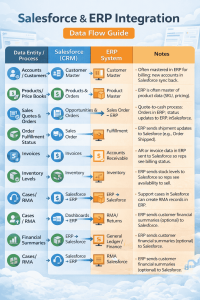
Note: This matrix will vary based on your industry and specific systems. For example, a software company using NetSuite might integrate subscription license info, whereas a manufacturer integrating SAP might focus on integrating production forecasts or procurement data. The key is to map out which system is the system-of-record for each entity and how updates propagate. Often, Salesforce holds the master for customer interactions (sales, service) and the ERP holds the master for transactions (orders, invoices, inventory), but there are exceptions.
In designing your data flow, also consider the frequency and trigger for each integration point. Some data (like a newly closed deal creating an ERP order) should flow in real-time or near-real-time, triggered by the event in Salesforce. Other data (like daily inventory levels or nightly financial totals) can be batch updated once per day. Align the sync frequency with business needs, e.g., if your sales reps often need up-to-the-minute stock data, an hourly or event-driven inventory update is warranted; if not, end-of-day might suffice.
Another consideration is data transformation and mapping. Salesforce and ERP systems rarely use identical data structures. For instance, Salesforce might have First Name/Last Name fields while an ERP has a single Name field, or Salesforce uses one currency while ERP uses another. Part of integration is defining how to translate and map these fields. Middleware tools provide mapping interfaces to do this visually; in direct integrations, you’d handle it in code. A well-documented field mapping schema is essential so everyone knows, for example, that “Account Name” in Salesforce goes to “Customer Name” in SAP’s BAPI, and that a Salesforce Opportunity Stage “Closed Won” corresponds to an ERP Order Status “New Order” or similar.
Finally, ensure you address conflict resolution. If both systems can update a piece of data (bi-directional sync), what happens if a Salesforce user and an ERP user edit the same record at the same time? Typically, you’ll choose one as the master or use timestamps to decide the winner. Establish rules to avoid ping-pong updates or overwriting newer info with old. For instance, you might say: ERP is the master of customer address for billing purposes, but Salesforce can suggest changes when a Salesforce update occurs, flag it for an ERP user to approve in the ERP. Each integration flow may need such business rules.
By creating a data flow matrix and an integration design document upfront, you clarify scope and prevent surprises during development. It serves as the blueprint that your technical team (or integration partner) will implement, and it helps stakeholders understand what information will be shared across the Salesforce and ERP divide.
Salesforce Integration with SAP ERP: Key Considerations and Example
When integrating Salesforce with SAP (one of the most widely used ERP systems in enterprises), there are some special considerations and approaches given SAP’s architecture and legacy. Whether you’re on SAP ECC or the newer SAP S/4HANA, or even a smaller SAP variant like Business One, the integration goals are similar but the methods can differ.
Typical Use Cases for SAP Integration
Many organizations use Salesforce as the CRM for managing leads, opportunities, and customer service, while SAP handles order management, inventory, production, and finance. A typical integration scenario is quote-to-cash: your sales team closes a deal in Salesforce, and an automated integration creates a corresponding Sales Order in SAP with all the details (customer info, products, pricing, etc.). SAP then manages fulfillment and invoicing. Throughout this process, Salesforce gets updates from SAP, for instance, when the order ships, when an invoice is issued, or if there’s a backlog on an item. Another common scenario is exposing SAP data to Salesforce users: SAP’s customer financial info, like credit status or past due invoices, can be visible on the Salesforce Account record. This helps salespeople make informed decisions (e.g. not confirming a new order if the customer is in credit hold). Integration can also go the other way: customer support cases in Salesforce might trigger actions in SAP (like creating a service order or return order).
Integration Methods:
SAP is a robust but complex system, historically not as open as modern cloud apps. However, it provides multiple integration methods: – SAP APIs and BAPIs: SAP exposes Business Application Programming Interfaces (BAPIs), which are essentially functions to interact with SAP objects (e.g. create an order, read a customer).
Modern SAP S/4HANA also offers RESTful OData services. Salesforce can call these APIs directly (via Apex callouts) or through middleware connectors. For example, a middleware like MuleSoft has a built-in SAP connector that can call BAPIs or IDoc interfaces without you writing low-level code. – IDocs (Intermediate Documents): SAP can be configured to output IDoc messages (structured text files) for data like orders, shipments, etc.
These IDocs can be picked up by an integration tool and translated into Salesforce API calls. Conversely, you can send IDocs into SAP to create or update records. This is more common in older SAP versions or in EDI-like batch integrations. – SAP Integration Suite (CPI): SAP’s own middleware (formerly called SAP CPI Cloud Platform Integration) provides flow templates to connect SAP and Salesforce.
For instance, SAP provides pre-built integration content for syncing customers or orders. Using SAP’s Integration Suite can be a good option if you want to stay within the SAP ecosystem and already have it, though it often requires SAP expertise to use effectively. – MuleSoft Anypoint Platform: Since Salesforce acquired MuleSoft, this is often a go-to solution for Salesforce-to-SAP integration.
MuleSoft offers SAP connectors and pre-built templates (like the SAP ERP and Salesforce integration template) that handle common scenarios. It simplifies dealing with SAP’s protocols (you configure endpoints and mappings rather than coding directly against BAPIs). Many Salesforce architects recommend MuleSoft for SAP integration due to its robust capabilities in handling complex transformations, on-premise connectivity, and scaling. – Other iPaaS / ETL Tools: You can use tools like Dell Boomi (which has SAP connectors), Informatica Cloud, Talend, or Celigo for Salesforce-SAP integration. Celigo, for instance, often markets connectors for NetSuite but also has SAP connectivity. These can work well, just ensure the tool you choose can handle SAP’s requirements and volume. – Custom Code with SAP SDKs: As a direct method, you could write a custom integration using SAP’s Java Connector (JCo) or .NET Connector to call SAP, and Salesforce’s APIs on the other side. This is heavy-lifting and usually not necessary with today’s integration platforms available, but it’s an option if you need extremely tailored logic and have SAP developers on hand.
Unique Challenges with SAP
Integrating with SAP often requires navigating its rich business logic and data model. SAP might require certain data fields or follow specific sequences (e.g., you can’t create an order without a customer, or you need to handle SAP’s concept of company codes, plant codes, etc.). You’ll likely need to consult an SAP functional analyst to understand what data an inbound order needs, or how to properly create a customer record via interface. Salesforce data might need enrichment before SAP can accept it (for example, mapping Salesforce “State” to SAP region codes, or assigning an SAP account group to a new customer from Salesforce). Testing is critical an order created in SAP via integration should look the same as one entered by a human SAP user.
Performance is another factor: SAP systems (especially older on-premise ones) may have throughput limits. You wouldn’t want to overload SAP by sending one API call for each of 10,000 records in a burst. It might prefer batch IDoc processing or a middleware that throttles calls. Always consider transaction volume and concurrency, adjusting integration design accordingly (e.g., queue up and process gradually if needed).
Security is paramount. Salesforce and SAP will exchange potentially sensitive data (financial info, PII, etc.). Ensure you use secure protocols (HTTPS, VPN/IPSec if connecting to on-prem SAP, etc.). Also, implement proper error handling if SAP is down or a transaction fails, the integration should catch it and retry or alert someone. Logging each transaction (success or failure) is advised for auditability.
Example
Let’s walk through a simplified example integration flow between Salesforce and SAP for Order Processing: 1. Salesforce to SAP (Order Creation): A sales rep converts an Opportunity to an Order in Salesforce (or uses a custom “Submit Order to SAP” button). Via integration, Salesforce (either directly through Apex callout or via middleware) sends the order data to SAP. This could be calling a web service on SAP that creates a Sales Order in module SD (Sales & Distribution). Key data like Account -> SAP Customer ID, Product -> SAP Material code, quantities, prices, etc., are mapped and sent. SAP processes the request and returns an order confirmation number or an error. The integration updates Salesforce: maybe writing back the SAP Order Number onto the Salesforce Order record and marking it as “Processed in SAP”. If there’s an error (say the customer ID didn’t match), Salesforce could log an error status for someone to fix. 2. SAP to Salesforce (Status Updates): As the order is fulfilled in SAP, perhaps an event is triggered or a scheduled job runs. For example, when the order ships, SAP could generate an IDoc or message. The integration middleware picks that up and updates the Salesforce Order record status to “Shipped” and populates tracking info. Similarly, when SAP creates an invoice for that order, an integration might create a corresponding Invoice record in Salesforce or update a field “Latest Invoice Paid: No” on the Account. This could happen in near real-time (with SAP pushing events) or in batch (nightly job queries all orders shipped that day and updates Salesforce in bulk). 3. Ongoing Sync (Accounts/Products): Meanwhile, every night, there is a batch sync for master data. New customers created in Salesforce today (perhaps as prospects) are sent to SAP to create customer master records, so that when an order goes through, SAP recognizes the customer. And new products or pricing changes from SAP are sent to Salesforce so that tomorrow’s quotes use the latest info.
This example illustrates a hybrid of real-time and batch integrations, which is quite common. SAP’s robust transaction processing, combined with Salesforce’s agile front-end, requires a carefully orchestrated dance to keep data aligned.
SAP-Specific Tools:
It’s worth mentioning SAP PI/PO (Process Integration / Process Orchestration), which some companies use on-prem as an ESB to integrate SAP with others. If your enterprise already uses SAP PI/PO, you might integrate Salesforce by connecting via SOAP web services or IDoc adapters through PI. However, many organizations are moving to cloud integration tools for connecting cloud apps like Salesforce rather than using the older on-prem middleware.
In summary, integrating Salesforce with SAP can unlock enormous value for sales and ops working in harmony, but it needs planning. Engage both Salesforce and SAP experts on your project. Make use of adapters and templates to reduce custom coding. Test thoroughly with real-world scenarios (including error cases). And ensure the solution is scalable (SAP volumes can be large) and secure. With the right architecture, you can achieve near real-time integration that makes it appear as if Salesforce and SAP are simply two interfaces on one giant system, rather than disparate worlds.
Salesforce Integration with NetSuite ERP: Key Considerations and Example
Integrating Salesforce with Oracle NetSuite (a leading cloud ERP, especially for mid-market companies) is a common and somewhat more straightforward scenario compared to SAP, because both Salesforce and NetSuite are cloud-based and API-friendly. Still, there are unique factors to consider for a smooth Salesforce NetSuite integration.
Typical Use Cases for NetSuite Integration
NetSuite often serves as the central ERP for financials, order management, inventory, procurement, etc., while Salesforce is used for CRM (sales, marketing, support). Common integration points include.
Lead-to-Customer Synchronization
When a lead or prospect converts to a customer (e.g. an Opportunity is won in Salesforce), that new customer needs to exist in NetSuite for billing and fulfillment. The integration can automatically create or update the Customer record in NetSuite with the data from Salesforce (company name, contacts, addresses).
Salesforce ERP integration
NetSuite’s item catalog and price lists can feed into Salesforce products and pricebooks so that sales quotes in Salesforce use the latest pricing maintained in NetSuite.
Sales Order Processing
Much like the SAP scenario, a confirmed order (or opportunity) in Salesforce should create a Sales Order in NetSuite. NetSuite will then handle fulfillment (shipping, invoicing). The order status and invoice number can be sent back to Salesforce.
Invoice and Payment Status
To give sales visibility into their accounts’ financial standing, integration often pulls NetSuite invoice statuses or payment updates into Salesforce. For example, a widget on the Salesforce Account page could show “Open Invoices” retrieved from NetSuite in real-time or near-real-time.
Service/Support Cases
If you use Salesforce for customer support, you might integrate cases with NetSuite if, say, NetSuite’s support module or RMA processes need to tie in. However, many NetSuite users keep support solely in Salesforce or another system and not in NetSuite, so this is optional.
Integration Approaches for NetSuite
NetSuite offers a few native integration options, and there’s a robust ecosystem of connectors:
NetSuite SuiteTalk (SOAP API)
NetSuite’s SuiteTalk is a SOAP-based web services API that allows external applications to retrieve and manipulate NetSuite records. Salesforce (via Apex callouts) or middleware can call SuiteTalk operations. SuiteTalk is comprehensive but can be verbose to work with (SOAP XML messages).
RESTlet and SuiteScript
NetSuite allows custom REST endpoints (RESTlets) written in SuiteScript (JavaScript) that can be deployed to perform specific actions. Some integrations use custom RESTlets for more efficient interactions. For example, a RESTlet could accept a JSON payload from Salesforce for an order, and internally create multiple records in NetSuite (customer, order, etc.) in one go with custom logic. This requires NetSuite development skills, but it can be powerful.
Integration Middleware/iPaaS
Many iPaaS providers have connectors for NetSuite. Celigo is one popular platform that actually specializes in NetSuite integrations (Celigo’s founders were early NetSuite employees). Celigo offers out-of-the-box NetSuite integration templates (e.g., for syncing customers, orders). Other platforms like MuleSoft, Boomi, and Jitterbit also support NetSuite. For example, Celigo or Boomi can be configured with mappings where Salesforce objects map to NetSuite objects through connectors without much code.
Native Connectors
There used to be a native “Salesforce for NetSuite” connector provided by NetSuite (as a managed package in Salesforce), essentially a pre-built integration product. This had mixed reviews and not all organizations use it now, but it’s worth checking if a newer version exists. Some choose off-the-shelf connectors from AppExchange or NetSuite SuiteApps that claim to integrate the two systems with minimal coding.
Custom code via Apex + NetSuite API
If using a small scope, one could write Apex classes in Salesforce to call NetSuite’s APIs directly. Given that both are cloud-based, no on-prem connectivity issues exist. But you’d have to handle authentication (NetSuite uses an OAuth or token-based auth now) and complex SOAP parsing in Apex, which is doable but a bit cumbersome. Usually, it’s faster to use a middleware or a pre-built connector unless the use case is extremely limited.
Considerations for NetSuite Integration
NetSuite being cloud-based means latency is low and connectivity is easier (no VPN or firewall hassle). However, governance limits are something to watch – both Salesforce and NetSuite have API usage limits. If you have high data volumes, you need to ensure you don’t exceed daily API calls or find ways to bulkify transactions. For instance, instead of 1000 separate API calls to insert 1000 records, use batch operations if available (NetSuite’s APIs allow some batching, and Salesforce has Bulk API if needed).
NetSuite’s data model has its own quirks. A “Customer” in NetSuite can represent both a company and contacts (they have sub-records for contacts, or you might treat them as separate records linked together). Ensure you map Salesforce Accounts and Contacts appropriately to NetSuite entities (some companies use Salesforce Accounts = NetSuite Customers, and Salesforce Contacts = NetSuite Contacts attached to those customers). If you have Salesforce Opportunities, NetSuite doesn’t have an “Opportunity” by default in the same way you might map Salesforce Opportunity to a NetSuite Estimate or directly to a Sales Order, depending on your process.
Error handling & Idempotency
If an integration attempt fails (say Salesforce tries to create an order in NetSuite, but some field is invalid), design how the error is logged and recovered. You might log an error on a custom object in Salesforce or have the middleware send an email alert. Retries can be automatic or manual after correction. For idempotency, consider using an external ID or unique key to avoid duplicate records if the call runs twice. For example, include the Salesforce Opportunity ID in a NetSuite custom field on the order. If the integration tries to create the order twice, the second time you detect one already exists and skip or update instead of creating a duplicate.
Security
Use secure connections (HTTPS with TLS). Both systems being cloud means typically you’re going over the internet with encryption. NetSuite’s API requires proper authentication; you’ll be storing credentials or tokens in whichever integration tool secures them, and don’t hard-code secrets.
Example:
- Account Sync
A Salesforce Account “Acme Corp” is marked as a customer ready for ERP. Perhaps on Opportunity close, you ensure the Account exists in NetSuite. The integration checks NetSuite for a customer with Acme’s name (or a custom ID). If not found, it creates a new Customer in NetSuite with details from Salesforce (billing address, etc.). If found, it can update certain fields or just use the existing record. Now we have a NetSuite Customer ID linked store that ID back on the Salesforce Account (maybe in a field NetSuite Customer ID) for future reference.
- Order Creation
Once the Account is synced, the integration creates the Sales Order in NetSuite. It takes the Opportunity products (Opportunity Line Items) from Salesforce and maps them to NetSuite Sales Order Line Items. It uses the NetSuite Item IDs (the integration might have looked these up if not stored in Salesforce). It sets the order’s amounts, any discounts, etc. The sales rep’s name could be mapped to a NetSuite sales rep field if needed. The integration triggers via a near real-time event (like Opportunity stage = Closed/Won), or could be a manual button that the user clicks, “Sync to NetSuite” which calls the integration.
- Confirmation and Feedback
NetSuite returns the new Sales Order Number (say SO1001). The integration updates the Salesforce Opportunity or creates a Salesforce Order record with that SO number and status “In Progress in NetSuite”. Now, Salesforce users know the order is in ERP.
- Fulfillment and Invoice
As NetSuite processes the order, it ships it and creates an Invoice. If real-time, NetSuite can send a signal via a webhook, or the integration platform polls periodically. The integration then updates Salesforce: maybe marking the Order as “Fulfilled” and even creating a related record for the Invoice (with invoice number, date, amount). If the company uses Salesforce for some customer service, they might create an Invoice object in Salesforce for reference.
- Payment Update
If NetSuite later records a payment (customer paid the invoice), an update could flow to Salesforce to mark that invoice as paid. This might trigger an email or just update a field the sales team can see (e.g. “Last Payment Date” on the Account).
With NetSuite, one thing to note is the availability of pre-built solutions. Because Salesforce-NetSuite is a popular combo, companies like Celigo have Integration Apps (formerly called SmartConnectors), which provide a lot of this functionality out-of-the-box with configuration. These can greatly speed up the project, as long as your requirements align with what the connector offers. If you have heavy customization on either side, you might still need to extend or customize beyond the packaged integration.
To ensure success, follow a process: Align Goals & Requirements (figure out what data and processes to connect), Choose the Right Approach (decide on a connector vs custom API vs middleware), Map Data & Logic carefully (field mapping between Salesforce and NetSuite), Build & Test thoroughly (in sandbox environments), and Monitor & Optimize post-launch for any adjustments needed. This iterative approach will help catch issues early and make sure the integration truly meets the business needs.
Overall, integrating Salesforce with NetSuite tends to be easier to implement and faster than with big ERPs like SAP, largely because both systems are modern cloud applications. Many businesses have achieved near real-time sync between Salesforce and NetSuite, enabling sales and finance to work hand-in-hand without missing a beat. For example, one company saw its online sales increase by 38% by syncing customer segments and order data directly into Salesforce from NetSuite, eliminating delays and manual reconciliation. The key is planning the data flows (like in our matrix), picking the integration method that fits your IT landscape (leveraging those pre-built connectors if possible), and thoroughly testing with realistic scenarios (especially around quarter-end when order volumes might spike).
Common Challenges and Mistakes in Salesforce Integrations
While the benefits of a well-integrated Salesforce-ERP environment are huge, getting there is not without pitfalls. Integration projects can be complex, touching critical data and processes. Here are some common challenges and mistakes organizations face, and tips on how to avoid them:
Data Consistency and Duplication
One of the fundamental challenges is ensuring data stays consistent across both systems. Without careful design, you can end up with duplicate records (e.g., the same customer exists twice in ERP because Salesforce and ERP both created it without syncing IDs) or conflicting data (Salesforce says one thing, ERP says another because an update didn’t flow through). A common mistake is failing to establish a single source of truth for each data object. To avoid this, define clearly which system “owns” each piece of data (for instance, ERP might own Product info, Salesforce owns Contact info, etc.) and enforce that via integration rules. Also implement data validation and de-duplication processes, for example, matching on emails or IDs before creating new records, and using integration middleware features to prevent duplicates. Regular data audits or reports that highlight discrepancies can catch issues early.
Automating Broken or Outdated Processes
There’s a saying: Don’t pave the cow path. A mistake some make is to integrate/automate a process that is fundamentally inefficient or no longer optimal. For instance, you might integrate a convoluted order approval process that could have been simplified. Or you replicate old data workflows that existed only because systems were separate. Integration is an opportunity to revisit business processes. Engage stakeholders to see if some steps can be eliminated or changed before you automate them. Otherwise, you risk cementing inefficiencies into your new integrated system. Always ask, “Should we be doing this process at all, or doing it differently, now that systems can talk?”
Lack of Stakeholder Involvement and Buy-In
Integration projects aren’t just an IT exercise; they deeply impact end users in sales, finance, operations, etc. A major mistake is failing to include key stakeholders from each department in the planning phase. If you don’t gather input from, say, the billing team, you might integrate something in a way that conflicts with how they need it, leading to frustration or workarounds later. Even worse, not involving end-users can lead to a lack of buy-in, they might not trust or adopt the new integrated system, continuing to do things manually, “their old way.” To avoid this, form a cross-functional project team with representatives from all affected areas. Communicate the integration plan, gather requirements, and address concerns. This also helps with change management; people are more receptive to using the new system if they’ve been part of shaping it.
Poor Data Quality and Preparation
Integration often shines a light on data quality issues. If Salesforce has junk data or ERP has outdated records, when you sync them, you get a bigger pile of junk. One must be cautious not to “garbage in, garbage out” across systems. A classic challenge is misaligned data formats or standards e.g., Salesforce states are free-text while ERP expects a two-letter code, or product codes don’t match exactly. It’s critical to do a data cleanup and alignment exercise before or as part of integration. Normalize values (for instance, ensure both systems use the same country codes or UoM units). Also, migrating historical data can be tricky do you bring over old orders to Salesforce? Many projects choose not to integrate everything bi-directionally, focusing on current and future transactions, while maybe doing a one-time migration of historical data for reporting. Be clear on that scope. Additionally, consider using a master data management (MDM) strategy if your enterprise is large an MDM tool can help keep data consistent across multiple systems, including CRM and ERP.
Underestimating Complexity (Integration is Hard)
At first glance, connecting System A to B might seem straightforward (just map field X to Y…). But the reality is often more complex. Business rules, exception cases, error handling, and volume concerns all add complexity. A common mistake is underestimating the effort and time required. This can lead to rushed implementations that aren’t fully tested. It’s better to acknowledge that integration projects are significant endeavors. Break the project into phases if needed (maybe integrate core account and order data first, then add more flows later) rather than trying a “big bang” integration of everything at once. Also allocate time for robust testing: unit testing, system integration testing, and UAT with end users. Simulate edge cases e.g., what if an order comes through with a product code that doesn’t exist in ERP? The integration should handle that gracefully (maybe put the order in a “pending” queue and alert someone). Test error scenarios as well as happy paths.
Security and Access Management Oversights
Another challenge is ensuring the integration is secure and compliant with policies. You are opening channels between systems, possibly across the internet or cloud. Mistakes here include using weak credentials, not encrypting data, or giving the integration more privileges than necessary. Always follow best practices: use encryption (HTTPS, VPN if needed), store credentials securely (or use OAuth tokens which can be revoked), and apply the principle of least privilege (the integration user in Salesforce should only have access to objects/fields needed; same for ERP side). Additionally, consider data privacy regulations if syncing personal data (like contacts), and ensure you handle consents and data residency if applicable. Log access and changes for audit trails (some industries require this).
Not Establishing Clear Monitoring & Support
Once the integration goes live, who watches it? A big mistake is treating the project as “done” after deployment without setting up proper monitoring, alerts, and support processes. Integrations can fail for various reasons: API downtime, record locks, and unexpected data causing errors. If no one is watching, issues can silently pile up (e.g., 50 orders failed to sync and nobody noticed until customers complained). Use the tools available: most middleware have dashboards and can send email/SMS alerts on failures. If it’s custom integration, build in logging to a file or database, and perhaps a scheduled report that flags any unsynced records. Define an on-call support plan: who gets notified if something breaks (maybe your Salesforce admin or an integration engineer) and what the steps are to triage and fix. Often, setting up a few proactive checks (like a daily summary of “0 orders failed to sync, 100 succeeded” email) provides peace of mind or immediate awareness if something’s off.
Overcomplicating the Solution
On the flip side of underestimating, some teams over-engineer the integration. It’s possible to create overly complex data flows or use a heavyweight solution where a simpler one would do. Aim for simplicity where possible; for example, if a nightly batch works fine, you might not need to build a real-time integration for that particular data. Don’t integrate data that no one actually needs in both systems. Each additional field or object you sync is another moving part that could break. Keep the scope focused on high-value integrations that deliver business value. Simpler integrations are easier to maintain and have fewer points of failure.
In summary, anticipating these challenges can help you plan better and avoid costly missteps. A well-integrated system requires not just good technology, but good planning, data governance, stakeholder buy-in, and ongoing management. By investing time in these areas, you set your Salesforce ERP integration up for long-term success rather than short-term glitches.
Estimating Integration Costs and Timelines (What to Expect)
One of the top questions stakeholders ask is: “How long will this integration take, and how much will it cost?” The answer, of course, is “it depends” on the scope, complexity, chosen tools, and resources. However, we can outline typical ranges and factors.
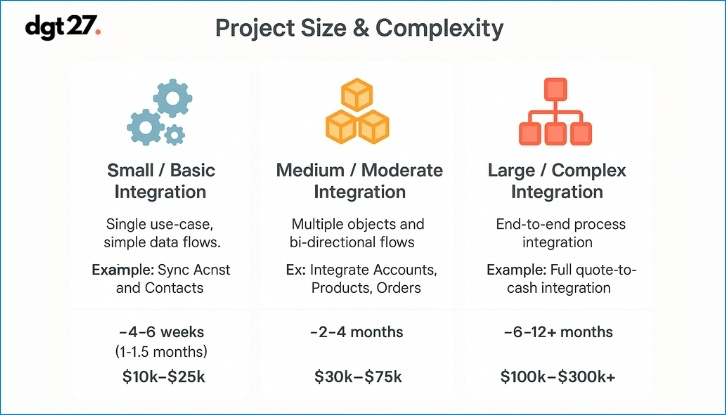
Below is a breakdown of project sizes with ballpark timelines and costs for Salesforce ERP integration:
Factors Influencing Cost/Time
Number of integration points:
Each object or process you integrate adds effort. Syncing five types of data isn’t 5x the work of one, but it’s incremental (you get some economy of scale once the base infrastructure is set).
– Complexity of transformations: If you can largely map fields one-to-one, great. But if you have to, say, calculate custom pricing logic or aggregate data or call multiple APIs to fulfill one integration, it’s more complex (hence more time/money).
– Systems involved: Integrating with a modern API-friendly ERP (like NetSuite or Dynamics 365) is generally faster than a legacy on-prem ERP where you might need extra adapters or VPN setup. SAP integration could be on the higher complexity side due to its enterprise nature. The more non-Salesforce systems in the mix, the more cost (e.g. Salesforce to ERP and to a separate data warehouse would be additional work).
– Real-time vs batch: Real-time integrations (especially requiring high availability) can be more work to implement and test than a simple batch job. They also might need more robust infrastructure (clustering, failover) if mission-critical.
– Middleware vs custom: Using an iPaaS can speed development, but it has a subscription cost. Custom coding might have no software cost, but a longer dev/test effort. Often, using established tools accelerates the timeline even if you pay licensing fees. Consider that a part of the cost.
– Resource costs: Are you using an external integration partner or doing it in-house? Partners will bill either a fixed fee or hourly; internal staff have opportunity costs and possibly training time. Rates vary globally; e.g., a US-based integration architect might be $150+ per hour, whereas an offshore developer might be $30-$50/hr. These differences can swing the project cost.
– Contingency and iteration: Always build in a buffer. Unexpected challenges (like a needed feature missing in an API, or performance tuning required) can add time. It’s wise to plan for perhaps 20% contingency in the timeline and budget for integration efforts.
– Testing and deployment: Don’t skimp on testing time in the plan. Integration testing can be the most time-consuming phase, coordinating Salesforce test data with ERP test data, and running scenarios. Also factor in time for performance testing if you expect high volumes (ensuring you can process e.g. 10k records/hour if needed without issues).
A note on ROI
While integration has a cost, it often delivers substantial ROI in efficiency gains and error reduction. Many organizations see payback within a year or less. For instance, automating data flow can save countless man-hours (sales ops, finance staff no longer doing manual exports/imports). There’s also the intangible but real benefit of faster order processing (improving cash flow) and better customer experience, which can lead to increased revenue. When justifying the cost, consider these factors.
To give a real-world benchmark: industry surveys and consulting studies have shown complex Salesforce ERP integrations or custom API integrations can run $20k up to $100k+, depending on scope, and a full Salesforce implementation with multiple integrations could span 4-6 weeks for small setups to 12-18 months for global rollouts. These align with our table above. Always tailor the estimate to your specific situation, but use these ranges as a starting framework.
In summary, be prepared for a meaningful investment in a Salesforce ERP integration project. It’s a bit like constructing a bridge between two islands of your business; the size of the chasm dictates how much engineering is needed. Budget not just for the initial build but for ongoing maintenance as well. Plan the rollout timeline in phases if possible, delivering incremental value (for example, maybe get Account/Contact sync done first in 2 months, then tackle Order sync, which takes another 2 months, etc.). This way, stakeholders see progress and benefits along the way.
How to Choose the Right Integration Partner or Tool
Selecting the right people and technologies to execute your Salesforce and ERP integration is as important as the integration design itself. A common question is whether to tackle the project in-house or engage an integration partner (consultant or firm), and which software tools or middleware to use. Here are some criteria and tips for making these decisions:
1. Evaluate Your In-House Capabilities
First, assess what skills your team has. Do you have Salesforce developers who also understand integration patterns? Do you have ERP technical experts (like SAP ABAP developers or NetSuite SuiteScript experts)? If your team has done similar integrations before and has bandwidth, you might execute internally. But often, companies have a Salesforce admin and an ERP admin who are busy with daily operations and not specialized in building integrations. If that’s the case, bringing in an external expert or partner can accelerate the project and avoid costly learning-curve mistakes. Be honest about your team’s experience with APIs, middleware, and cross-system projects.
2. Integration Partner Expertise
If you opt for a partner, look for those with specific experience in Salesforce and your ERP. Verify that they have done similar projects, for example, a partner that advertises Salesforce integration expertise with SAP or NetSuite specifically.
Ask about their certifications and credentials: are they a certified Salesforce partner? Do they have consultants familiar with the ERP’s integration methods? A good partner should be able to show case studies or references of past Salesforce ERP integrations. Client reviews and third-party ratings are valuable, for instance, check platforms like Clutch.co for reviews of integration firms.
If you are evaluating external expertise, comparing the top Salesforce ERP integration companies can help you assess providers based on ERP experience, Salesforce capabilities, integration approach, and project fit.
3. Tool Selection – Middleware and Connectors
As discussed earlier, you need to pick the integration approach. This often means picking a middleware/iPaaS if not going custom.
– Criteria to consider: Does it have pre-built connectors for your systems? E.g., MuleSoft has a SAP connector; Celigo has a NetSuite-Salesforce template. Using a tool that “speaks” the language of your systems saves time.
– Ease of use vs. flexibility: Some tools are more point-and-click (which can be quicker for simple needs) while others allow deep customization (needed for complex logic). Determine which is more important for you.
– Scalability and performance: If you expect high transaction volumes, ensure the platform can scale (e.g., can handle batch loads, has queuing, etc.). Also consider the pricing model some iPaaS charge by number of records or API calls per month, make sure it fits your volume economically.
– On-premise connectivity: If your ERP is on-prem, can the tool connect securely (maybe it has an agent or you’ll need a VPN)? – Total cost of ownership: Evaluate not just license cost, but also the cost of development and maintenance. A “cheaper” tool might require more dev hours to do what a slightly pricier tool could do out of the box.
Often, companies create a shortlist of 2-3 integration platforms and maybe do a trial or proof-of-concept to see which one fits best.
4. Support and Maintenance Services
Integration isn’t a one-and-done thing will need updates (e.g., API versions change, you add new fields or new integration requirements). Decide who will maintain the integration. If using a partner, can they provide ongoing support? It might be wise to have a support retainer or plan in place.
If using internal staff, ensure they get properly trained during the project so they understand how everything works. The last thing you want is an integration that breaks, and no one knows how to fix it because the original developer left or the partner’s contract ended. Knowledge transfer is crucial; insist on documentation of the integration design, field mappings, and any custom code.
5. Vendor Selection for Partners: Additional Tips
When evaluating consulting partners, consider:
– Cultural fit and communication: Integration projects require a lot of back-and-forth between technical and business folks. A partner that communicates well and understands your business context (not just the tech) is valuable.
– Project approach: Ask about their methodology. Do they follow agile (iterative build and test)? Will they provide prototypes or demonstrations during the build to ensure it’s on track? Avoid black-box development where you only see the result at the end.
– Team composition: Who exactly will work on your project? Sometimes a sales pitch is done by a senior architect, but the work is handed to junior developers with less experience. That’s fine if they’re capable, but ensure there is proper oversight. You might request an architect to be involved in design and code review.
– Cost vs quality: Don’t automatically choose the cheapest quote; integration is an area where quality counts. A low-budget provider might miss things that later cause expensive rework or system downtime. Weigh the cost against their proven expertise.
6. Ensure Alignment with Business Goals
Whichever partner or tool you choose, they should show an understanding of why you are integrating, not just how. They should help you refine requirements and perhaps suggest improvements (e.g., “Do you really need to sync these 20 fields? Maybe just 10 would do, reducing complexity”). A good partner is consultative, they help you achieve the business outcome (faster sales process, better data visibility) rather than simply coding to spec, even if the spec has flaws.
7. Check References and Success Stories
It’s perfectly acceptable to ask a partner for references other clients you can talk to who did a similar project. Also, read any success stories or case studies they have. For instance, if a consulting firm can show that they integrated Salesforce with SAP for Company X and it resulted in, say, 50% faster order processing and 30% reduction in manual work, that’s a good sign. Many integration partners list such achievements on their websites or profiles.
8. Flexibility and Future Needs
Consider not just the current project, but future expansions. If you plan to integrate more systems down the line (maybe add an e-commerce platform or a data lake), pick a tool and partner that can handle a broader integration landscape. It might be beyond just Salesforce and ERP. It often makes sense to standardize on one integration platform for the company if possible, rather than one tool for Salesforce-ERP and another for different integrations, as that can increase maintenance burden.
In summary, choosing the right partner and tools comes down to experience, reliability, and alignment with your needs. A successful integration can be complex, so having seasoned experts and robust technology in your corner is invaluable. It might cost a bit more upfront, but as mentioned in the challenges section, a botched integration or one that needs to be redone is far more costly. So do your due diligence, and invest wisely in a team and platform that will deliver a solid, scalable integration.
Top Integration Companies for ERP with Salesforce
When planning a Salesforce ERP integration, it’s crucial to work with experts who understand both ecosystems. Below are five top companies known for delivering ERP integrations with Salesforce including SAP and NetSuite listed with concise overviews:
1. dgt27 (Salesforce ERP Integration Specialist)
dgt27 is a Salesforce consulting firm focused on deep ERP integrations, including SAP, NetSuite, Acumatica and Microsoft Dynamics. Known for strategic consulting, real-time data flows, and 5.0/5.0 Clutch reviews.
2. Accenture
A Salesforce Global Strategic Partner with strong SAP and Oracle expertise, Accenture delivers large-scale, complex integrations using frameworks and platforms like MuleSoft, often tailored for Fortune 500 clients.
3. Deloitte Digital
Deloitte blends robust Salesforce and ERP (SAP, Oracle) practices to design scalable architectures. Their teams often deploy middleware (MuleSoft, Boomi) in digital transformation projects for large enterprises.
4. Coastal Cloud
A U.S.-based Salesforce Platinum Partner specializing in CRM implementations and ERP integrations (like NetSuite, Microsoft Dynamics). Coastal Cloud emphasizes tailored solutions and has high ratings on AppExchange.
5. MuleSoft (Salesforce)
MuleSoft, owned by Salesforce, is a leading integration platform. Though not a consultancy, many companies use its Anypoint Platform (with partners) to integrate Salesforce with SAP, Oracle, and NetSuite at scale.
Tip: Choose a partner based on your ERP system, project size, and need for flexibility. The “best” provider is the one that aligns with your architecture, timeline, and support expectations.
Final Words
Integrating Salesforce with your ERP system is a transformative step that can elevate your business operations to the next level. We’ve explored how a well-architected integration enables end-to-end visibility, streamlined processes, and data-driven decision making across your organization. From choosing the right architecture pattern to avoiding common pitfalls, and from selecting a capable partner to leveraging the integration for maximum ROI, this guide has covered the key aspects to ensure your ERP integration succeeds.
The benefits a single source of truth, faster sales cycles, accurate order processing, happier customers, and empowered employees make the effort worthwhile. But success requires more than just tools; it demands strategic planning and expertise. As you embark on or continue this integration journey, keep the focus on the business outcomes: breaking down silos and enabling agility. Done right, Salesforce ERP integration lets your front-office and back-office operate in unison, so you can respond to customers and market changes with speed and intelligence.
Finally, if you’re looking for guidance to make this vision a reality, we’re here to help. Ready to integrate and accelerate? Feel free to book a free 30-minute architectural consultation with our Salesforce integration experts. We’ll discuss your specific needs and outline a roadmap to connect Salesforce with your ERP for optimal results. Contact us to schedule your free consultation let’s bridge those systems and drive your success with a unified, scalable solution.
Your enterprise’s next level of efficiency and growth could be one integration away. Don’t let your CRM and ERP operate in separate worlds. Connect them, and watch your organization thrive with newfound synergy and insight.


Leave Comment
Was this blog helpful?
Was this blog helpful?